Mobile Notary Services are Now Available - Nationwide Coverage Learn More →


Every title professional knows the feeling. It is 4 PM, you have three closings tomorrow, and your desk is buried under underwriter guidelines, HOA documents, commitment letters, state regulation printouts, and a stack of lender requirements that arrived this morning. You need one specific piece of information, and you do not have time to read 200 pages to find it.
That frustration is exactly why a growing number of title pros are quietly adding Google NotebookLM to their workflow. Not as a gimmick. Not as an experiment. As a genuine time-saver that changes how they interact with documents on a daily basis.
If you have not heard of it yet, this guide covers everything you need to know: what it is, how to set it up in five minutes, and exactly how title agencies are putting it to real use right now.
NotebookLM is a free AI-powered research tool built by Google. You upload your own documents, PDFs, Google Docs, web pages, or even YouTube video links, and then ask it questions in plain English. It answers based only on the documents you gave it, pulling direct quotes and citations from your source material so you can verify every answer.
Think of it as a research assistant who has read every document you have uploaded and can answer your questions instantly with references. It does not pull from the general internet. It works strictly from what you upload, which matters a great deal in title work where accuracy is non-negotiable.
It is completely free to use with any Google account at notebooklm.google.com. No credit card required. No software to download. No IT department needed. If you have a Gmail address, you already have everything you need to get started.
Title work is fundamentally a document-intensive profession. Title commitments, underwriter guidelines, HOA estoppel letters, municipal lien search results, lender instructions, and state statutes are not short reads. They are dense, legal, and packed with details that must be understood correctly or a closing suffers for it.
Most AI tools, including ChatGPT, pull answers from their general training data. That means they can hallucinate facts, cite outdated regulations, or give you generic answers that have nothing to do with your specific documents. NotebookLM is fundamentally different. It only works from what you upload. There is no outside knowledge leaking in. That is not a limitation, that is the feature.
When you upload your underwriter's actual guidelines and ask "What is the requirement for gap coverage in Florida?" you get the answer directly from your document, with the exact paragraph cited so you can click and verify it yourself. That is the kind of reliability that matters when you are about to make a decision that affects a closing.
Consider how much time title professionals spend doing exactly this kind of lookup every single day. Searching through a 150-page underwriter manual for one clause. Reviewing an HOA's CC&Rs to check whether a right of first refusal exists. Cross-referencing a title commitment's Schedule B exceptions against lender instructions. Every one of those tasks is faster with NotebookLM handling the search while you handle the judgment call.
Getting started with NotebookLM requires no technical background whatsoever. Here is the complete setup process from start to first answer.
Step 1: Go to notebooklm.google.com and sign in with your Google account. If you use Gmail for work or personally, you are already set. No new account creation needed.
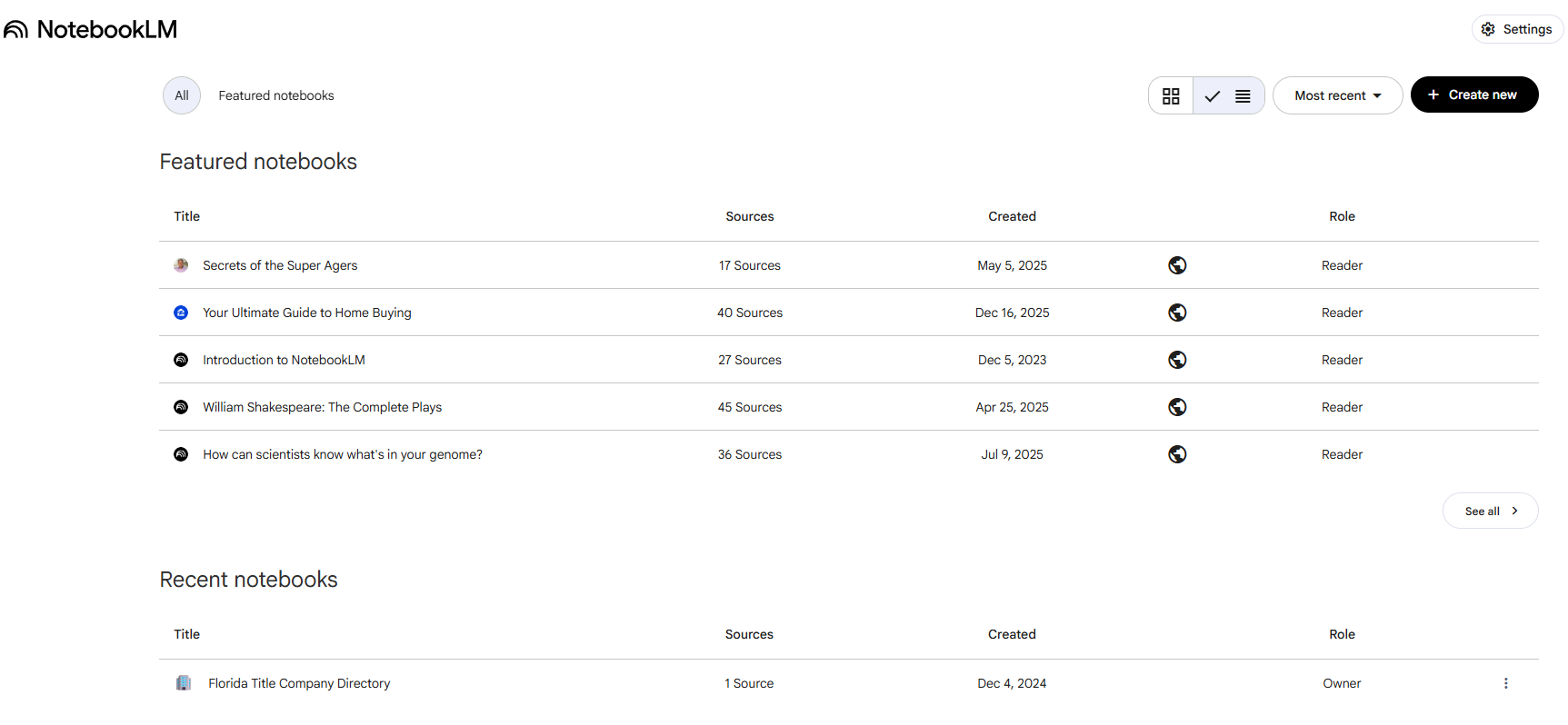
Step 2: Click "Create New" Give it a descriptive name that matches the documents you are loading, something like "HOA Guidelines," "Underwriter Manual," or "Florida Regulations." You will likely build several notebooks over time, so naming them clearly matters.
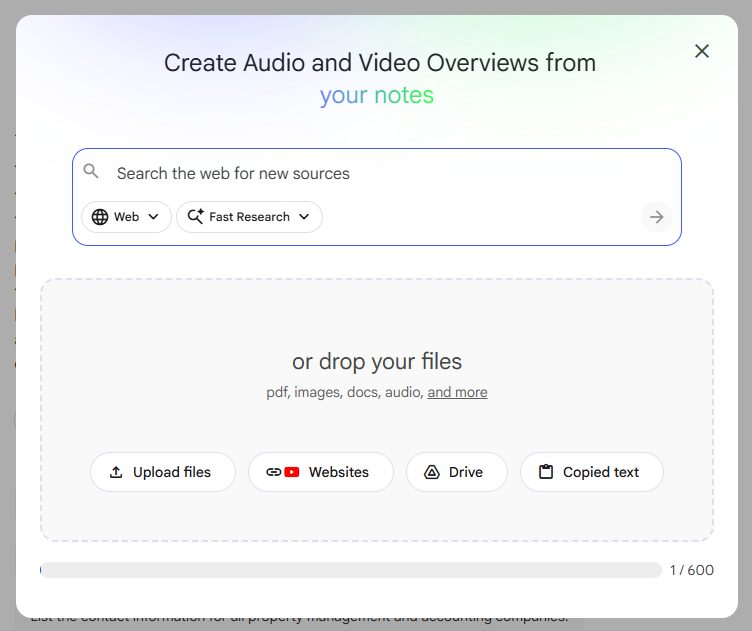
Step 3: Upload your sources. Click the "+ Add source" button and upload PDFs directly, paste in Google Doc links, or add URLs to web pages you want included. NotebookLM accepts up to 50 sources per notebook. For most title use cases, you will be loading between 1 and 10 documents depending on the topic.
Step 4: Ask your first question. Once your sources are loaded and processed, usually under a minute, type a question into the chat panel on the right. Try something like "What are the fee caps for HOA estoppel letters in Florida?" The answer comes back with a citation showing precisely where it found the information.
That is the complete setup. From opening the browser tab to getting your first real answer takes about five minutes on the first use. Subsequent notebooks go even faster.
Here is the feature that surprises people most: NotebookLM can generate a full audio overview of any notebook. It creates a two-host, podcast-style conversation where AI voices discuss, summarize, and explain the documents you have uploaded, including back and forth dialogue about the most important points.
That might sound like a novelty at first. But think about how title professionals actually spend their time outside a desk. Driving between signings. Going over material during lunch. Commuting home after a long day. The Audio Overview feature lets you load up a complex set of documents, hit generate, and listen to a clear summary on the go without reading a single word.
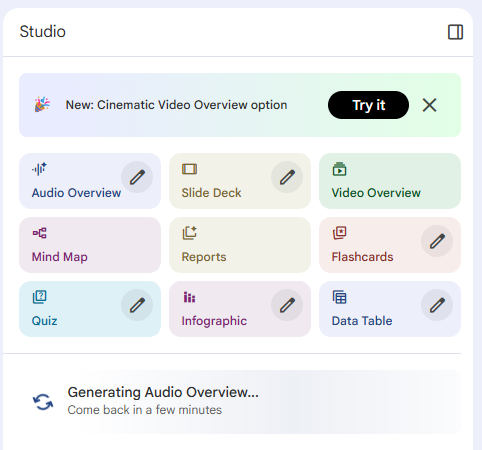
It is particularly useful for getting new staff up to speed. Instead of handing a new hire a 90-page underwriter manual and hoping they absorb it, you generate an Audio Overview and let them listen while they work through their first few files. Information presented conversationally tends to stick better than content skimmed off a page, and some agencies are now building this into their formal onboarding process.
1. Underwriter Guidelines Research
Upload your underwriter's complete guidelines, all 150 or 200 pages, and query the document in real time during a live transaction. Instead of flipping through a manual while a lender is on hold, type your question and get a cited answer in seconds. "What is the underwriter's position on insuring over an open permit in Florida?" The answer comes back with the exact clause so you can verify it on the spot. This alone can change the pace of how your team handles complex or unusual transactions.
2. Commitment Letter Review
Upload a title commitment and ask it to summarize the Schedule B exceptions, flag anything unusual, or explain what a specific exception means in plain language. As a first pass when you are processing high volume, it helps you prioritize which commitments need your closest attention. It is a fast second set of eyes, not a replacement for yours.
3. HOA Document Analysis
Anyone who has worked with HOA estoppels knows the documents vary wildly from one association to the next. Upload the CC&Rs, bylaws, and estoppel letter together into one notebook and ask questions across all three simultaneously. "Are there transfer fees?" "Is there a right of first refusal?" "Does this HOA have any pending litigation?" NotebookLM finds the answers without you hunting through three separate PDFs.
4. State Regulation Quick Reference
Florida's HOA estoppel statutes, municipal lien search requirements, recording fee schedules, and transfer tax rules change periodically. Upload the relevant state statutes and query them directly rather than hunting through government websites every time. Build a "Florida Regulations" notebook and update it at the start of each legislative session.
5. Staff Training and Knowledge Transfer
Create a training notebook that includes your standard operating procedures, your underwriter manual, and your most common transaction type guidelines. New team members can ask it questions as they work through their first real files, getting answers grounded in your actual company documentation, not generic online advice that may not match how your office operates.
If you are already using ChatGPT, you are not making a mistake. It is genuinely useful for drafting emails, brainstorming, explaining concepts, and writing client-facing communication. But the two tools solve fundamentally different problems, and understanding that distinction matters.
Use ChatGPT when you need to write or rewrite something, brainstorm ideas, or draft client-facing communication. It is broad and flexible and works best for open-ended tasks where general knowledge is enough.
Use NotebookLM when you need to find something specific inside a document you already have. It is precise, citation-based, and grounded entirely in your source material. For finding information inside dense documents, nothing currently available matches it for ease of use.
The practical answer for most title teams: use both. ChatGPT for communication and general research, NotebookLM for document-based lookups. We covered this broader topic in our post on whether AI will replace title professionals. The short answer: it will not, but title professionals using these tools thoughtfully are already processing more volume with fewer errors.
We would rather be direct about the limitations than oversell a tool and lose your trust.
It does not know what it does not have. If you forget to upload a relevant document, NotebookLM will not flag that gap. If your underwriter guidelines are outdated and you upload the old version, it will answer based on outdated information. The quality of your answers depends entirely on how carefully you maintain your source documents.
It does not replace legal or underwriting judgment. It can tell you what a document says with excellent accuracy. It cannot tell you whether a specific clause is legally sufficient for your transaction or whether a title exception is insurable. That expertise lives with your team and your underwriter. NotebookLM surfaces information, you make the call.
It is not a closing software integration. NotebookLM is a standalone research tool. It does not connect to SoftPro, Qualia, ResWare, or any order management system. You use it alongside your existing workflow, not instead of it.
It is not infallible on complex documents. Like any AI tool, it can occasionally misread a table or miss context in a footnote. For any answer that directly affects a closing decision, verify it against the source document before acting.
Build topic-specific notebooks, not one large catch-all. A notebook focused on "Florida HOA Regulations" will return faster, more accurate answers than one where you have loaded 40 unrelated documents. Keep each notebook scoped to a single subject area.
Always upload the most current versions of your documents. When your underwriter releases updated guidelines, swap out the old PDF immediately. When Florida statutes change, update your regulation notebook. Set a quarterly reminder to review your core notebooks.
Ask follow-up questions rather than accepting a vague first answer. If the initial response is close but not quite right, drill down with a more specific follow-up. The chat context carries through the conversation, so you can refine iteratively just as you would with a person.
Use it to prepare for difficult client calls. Before explaining a complex title exception to a buyer with no real estate background, load the relevant documents and ask NotebookLM to explain the issue in plain language. It saves you from translating legal jargon under pressure while someone anxious is on the other end of the line.
Share notebooks with your entire team. NotebookLM supports notebook sharing, so you can build and maintain a notebook once and give your whole team access. One person keeps the sources current, and everyone benefits from the same searchable, authoritative reference.
The title industry keeps getting more complex, not less. Regulatory requirements are expanding. The pace of closings in competitive markets leaves little margin for slow research. The documentation volume per transaction continues to grow. Tools like NotebookLM do not change what you need to know. They change how fast you can find it, and that gap compounds over hundreds of transactions every year.
We are watching the 2026 title industry continue its shift toward agencies that do more with the same resources. That does not mean cutting corners. It means giving experienced people better tools so they can focus their attention on decisions and relationships that require a human touch, rather than spending that time manually searching documents they have read a hundred times before.
NotebookLM is one of the best free tools available for exactly that purpose, and five minutes is genuinely all it takes to get started. Create a notebook tonight, upload your most-referenced document, and ask it one question. That is all it takes to understand what it can do for your workflow.
If you want to see how Skyline Title Support helps title agencies run more efficiently, from HOA estoppels and municipal lien searches to FinCEN compliance reporting, we would be glad to walk you through what we do. Book a quick demo and let us show you.